
 Login
Login 

Safety Systems & Forms
Lone Worker Check-Ins for Remote Crews: The Procedure, the Rules and What a Roster Can Do
By Christian Tietzel · 22 September 2026 · Updated 5 October 2026

A lone worker check-in is a scheduled contact between a worker who is out of sight and earshot of anyone else and a named person whose job is to notice if it does not arrive. Australian WHS law sets no interval for it. Regulation 48 of the model WHS Regulations requires a system of work with effective communication for remote or isolated work, and the interval, the method and what happens when a check-in is missed come from your own risk assessment.
This is general information, not safety advice for a specific site. Confirm the rules with the WHS regulator where the work happens and with your principal contractor.
Who counts as a lone worker on a field crew
The regulations do not use the words “lone worker”. The model WHS Regulations define remote or isolated work as work that is isolated from the assistance of other persons because of location, time or the nature of the work, and assistance includes rescue, medical assistance and the attendance of emergency service workers. Western Australia’s regulations add mine emergency workers to that list (WorkSafe WA’s guidance calls them mine emergency response teams), which tells you who the regulation was written with in mind.
A practical test regulators such as WorkSafe ACT use is simpler: a person is working alone when they cannot be seen or heard by another person and do not expect anyone to come by for some time. WorkSafe ACT puts it that way, and lists the factors that raise the risk: how long the person is alone, the time of day, the lack of a telephone or other communication tool, the location, and the skills and character of the person.
On a field crew that catches more people than the word “remote” suggests. A water cart driver on a haul road. A drill offsider walking the line to the next hole. A fitter sent to a pump station two hours out on a Sunday. A fence or pipeline crew that spreads out to one person per kilometre by mid-morning. A supervisor driving between sites after dark. An electrician in a switchroom after everyone else has gone. None of them is in the Simpson Desert, and every one of them is isolated by location, time or the nature of the work for at least part of the shift. The first job of the procedure is to say so on the roster.
What the law requires, and what it does not
Regulation 48 does two things. It puts remote or isolated work inside the general risk management duty, and it says that in minimising those risks a business must provide a system of work that includes effective communication with the worker. The Queensland regulation, which adopts the model wording, attaches a maximum penalty of 60 penalty units to the communication duty. NSW, South Australia, Tasmania, the Northern Territory, the ACT and the Commonwealth carry the same clause, and Western Australia has since its WHS Regulations commenced in 2022. Victoria is the exception: it is not a harmonised state. WorkSafe Victoria rests the physical side of remote and isolated work on the employer’s general duty under the OHS Act 2004, and since 1 December 2025 its Occupational Health and Safety (Psychological Health) Regulations 2025 require employers to identify and control psychosocial hazards, a list on which WorkSafe Victoria puts remote and isolated work. The practical controls are the same.
What the law does not do is set a check-in interval. WorkSafe WA lists “regular check-in procedures” and “journey management plans” among the controls and leaves regular to the risk assessment. WorkSafe Queensland suggests a call-in system “at specific times, or when you move to another location”. SafeWork SA describes a check-in “at a nominated time” and an emergency response plan for when a worker fails to report in at the agreed time. The only interval we found on a regulator page is on WorkSafe Victoria’s farm guidance, which says a designated contact person “could call or text message every 2 hours”, as an example, and adds the reason the whole procedure exists: if someone fails to return or respond, “people will know where to start searching”.
One thing you will read on vendor sites is not true. Monitoring lone workers did not become “compulsory” nationally on 1 January 2014. That date is Queensland’s: its Work Health and Safety Regulation 2011 deferred the start of section 48 to 1 January 2014, two years behind the rest of the regulation, and the section set no interval when it arrived. The interval is yours to justify, which is the harder standard, because “we followed the rule” is not available as an answer.
The check-in procedure, step by step
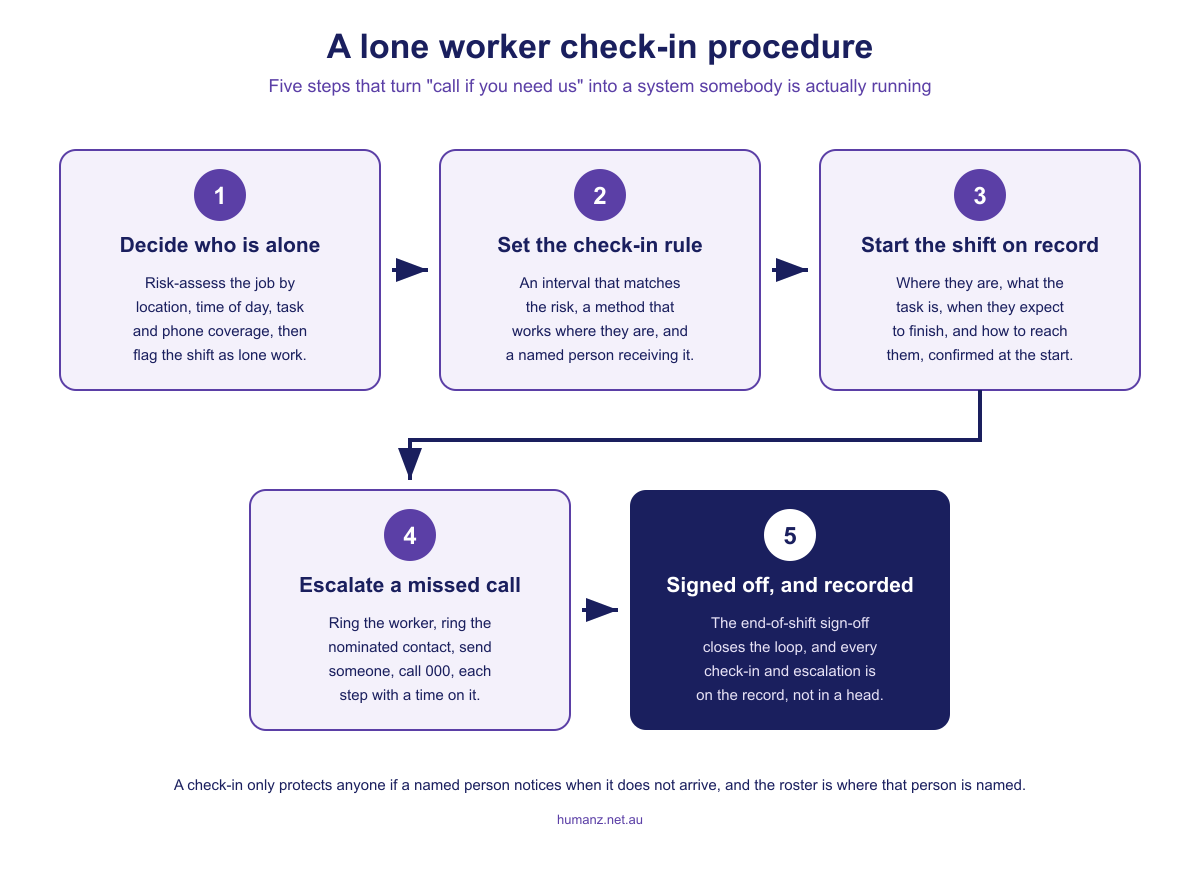
The regulator pages agree on the shape: a communication system that works where the person is, regular contact with a supervisor, a check-in at the start and a sign-off at the end of the work period, an emergency plan for the missed contact, and a buddy system or supervisor visits where the work allows. SafeWork NSW lists exactly those, and adds the control that comes before all of them: design the work so people do not work alone in the first place. When that is not practicable, the procedure has five parts.
1. Decide who is alone, and write it on the roster
The risk assessment runs on the factors the regulators name: location and how far help is, time of day and whether it is after hours, how long the person will be alone, what the task is (working at height, with plant, in a confined space or with chemicals is not the same as reading a meter), whether there is mobile coverage, and the person themselves, including any medical condition that could become an emergency if they are on their own. The output is a flag on the shift. If the shift is lone work, the roster says so, the check-in rule attaches to it, and the receiver is named on the same line. A procedure that lives only in the safety management system gets applied to the jobs somebody remembers.
2. Set the interval by risk, and the method by coverage
| Risk band | Typical situation | Check-in rule |
|---|---|---|
| Low | Daytime, in town, mobile coverage, routine task | Start of shift and sign-off at the end |
| Moderate | Alone for more than a couple of hours, or after hours, with coverage | Start, sign-off, and a contact every two hours or at each change of location |
| High | Remote, at night, with plant, at height or in a confined space, or no coverage | Hourly contact or a monitored device with automatic alerts, plus start and sign-off |
| Driving | Any journey on remote roads or after a long shift | Contact at departure, at each planned stop and on arrival, under a journey management plan |
The bands are a starting point, not a rule; your own assessment sets them. The method is decided by where the person is, not by what is convenient in the office. WorkSafe WA’s list is the right one to work from: mobile phones with reception, personal duress alarms, two-way radios, satellite phones and other satellite devices, and personal locator or emergency beacons. The phrase that matters is “with reception”. A mobile phone with no signal is not a communication system, and a large share of Australian field work happens where there is none. UHF radio covers line of sight and not much more; satellite phones and satellite messengers cover the rest.
3. Name the receiver, and roster them too
“Check in with the office” fails at 6 pm on a Friday. The receiver is a named person who is themselves on shift, with a backup, and both of them know they are holding a lone worker that day. For crews that work after hours, that usually means a supervisor’s phone on a rotation, a security desk, or a monitoring service; the Victorian CFA, which has people working alone after hours across the state, set up its check-ins through an externally run 24-hour welfare service, described in a 2019 CFA article, where the worker lodges the task and a check-in frequency, responds to a text at each interval, and closes the event when they are done. A group channel that reaches everyone currently responsible beats a single phone number, because a single number has a single point of failure.
4. Start the shift on record
The first check-in carries the information a search would need: where the person is, what they are doing, the vehicle, when they expect to finish and how to reach them. WorkSafe Queensland published an incident alert in 2024 after a worker whose vehicle became bogged in what the alert says was about 38 to 40 degree heat set out on foot to seek help and was found deceased two days later. Its advice is the first check-in in one sentence: before you leave, tell someone where you are going and when you will return. Capture it on something that timestamps itself, sits against the job and works without signal; a digital prestart form on the worker’s phone does all three, and a text message does none of them.
5. Escalate a missed check-in on a clock
The missed check-in is the whole reason the procedure exists, and the escalation has to be written down with times on it, because the person running it will be doing something else when the alarm goes off. A ladder that works for most field crews:
- At the due time plus 10 minutes: ring the worker. Try the second number, the radio, the satellite device.
- Plus 20 minutes: ring the nominated contact, the site or the client, and anyone else who might have eyes on the person.
- Plus 30 minutes: send the nearest person, or ask the site to.
- Plus 45 to 60 minutes, earlier for high-risk work: call 000 with the last known location, the vehicle, the task and the time of the last contact.
- Log every step as it happens, with who did what and when.
The clock starts at the due time, not when somebody notices, which is why the receiver is a rostered person, not an inbox.
End of shift: sign off, then record it
The sign-off closes the loop. Queensland and NSW both describe it as the check-in’s other half, a check-in at the beginning and a sign-off at the end of the working period, and a sign-off that does not arrive is treated exactly like a missed check-in. Then the record: every check-in, every missed one, every escalation step and its time. When a regulator, a client or a coroner asks what the system of work was, the answer is the log, and the log is only complete if the check-ins were captured where they happened rather than reconstructed from a phone’s call history.
Journey management: the check-in on wheels
The drive is often the most isolated part of a field worker’s day, and for DIDO crews it is the fatigue exposure as well. A journey management plan is the check-in procedure applied to a trip: the route, the planned stops, a contact at departure and arrival and at each stop, the vehicle and its recovery gear, and the rule for a breakdown, which on remote roads is to stay with the vehicle. WorkSafe WA names journey management plans among the controls for remote work, and the Queensland alert above is what a missing one looks like. If your crews drive between sites after long shifts, the plan belongs beside the fatigue management plan, and the shift that ends with a two-hour drive home should carry the drive on the roster so the fatigue rules can see it. Our guide to FIFO, DIDO and BIBO covers the commute models and what each asks of the roster.
What devices and apps do that a roster cannot
Be clear about this before choosing anything. A lone worker device or app does four things a roster never will: it reminds the worker to check in and escalates automatically to a monitoring centre when they do not, it sends a location with the alarm, it raises a duress or SOS alert at the press of a button, and, on the better devices, it raises a no-movement or fall alarm on its own. WorkSafe Queensland lists that last kind, non-movement sensors that activate an alarm if the device has not moved within a set time, among the communication systems it expects for isolated work, and Victoria lists automatic warning devices activated by absence of activity.
For high-risk lone work, a monitored device with satellite coverage is the right answer and a roster is not a substitute for it. The device is the alarm; the roster is the system the alarm sits inside. If the device you have in mind is an app on the worker’s phone, the next section is for you, and the one after it is what the system side means in practice.
Lone worker apps: what they do, what to look for and what the roster still has to do
A lone worker app puts the alarm on the phone the worker already carries, instead of a separate device. A typical app on an iPhone or Android phone does five things. It runs a timed check-in: the worker starts a session with a task and a duration, and if nobody taps in before the timer runs out it escalates on its own, first to the worker, then to whoever is nominated. It carries a duress or SOS button. It sends the phone’s location with the alarm, and some send it through the session so the last known position is minutes old, not hours. Several use the phone’s sensors for man-down or no-movement detection, the kind of non-movement alarm the Queensland and Victorian regulators list, though a phone in a pocket does it less reliably than a unit on a belt. Most include a journey mode: a planned route, an expected arrival and an alarm if the worker is overdue. Every one of them ends with a person: the vendor’s monitored response centre, staffed around the clock, or your own supervisor by push notification, text and call.
The limits are the phone’s. It needs reception, so the app inherits the rule from step 2: a phone with no signal is not a communication system, and an app on one is a timer in a pocket. It needs a charged phone, on the worker, with the app running, which on a twelve-hour shift in a hot cab is three separate assumptions. Some sites ban phones in operating areas, and a process plant will not make an exception for your app. Where lone work is most dangerous, the remote end of the table above, the answer is still the rest of WorkSafe WA’s list: a satellite phone or messenger, a two-way radio or a personal locator beacon, with the app as the check-in layer where there is coverage.
Choosing one for an Australian crew comes down to a few questions.
- Who answers the alarm at 2 am? A monitoring centre in Australia that can escalate to 000 on your behalf, or your own supervisor’s phone. Both work; a supervisor who is asleep does not.
- Does it cover the actual sites? Check coverage where your people work, not head office, and ask what happens when it loses signal mid-session.
- iPhone and Android, with the same features on each. Your crew carries whatever phones it carries.
- Offline behaviour. Whether a missed check-in still escalates from the server side when the phone drops out, and whether the session survives it.
- Battery. Continuous location tracking can flatten a phone by mid-afternoon; ask what a shift costs in charge and whether the receiver is warned when it dies.
- Escalation that follows the roster. The alarm should go to the supervisor on shift tonight, not the person who set the app up in March.
- Records. Every check-in, missed check-in and alarm, timestamped and exportable, because that log is the answer when a regulator, client or coroner asks what the system of work was.
Then the division of labour, which app comparisons skip. The app is the alarm: it tells someone that this worker, on this session, has gone quiet. It does not know there are eleven lone shifts on tomorrow’s roster, that the night receiver is on leave, or that the new starter has never worked alone before. That is the roster’s job: who is alone before the day starts, who is on shift to watch them, and which check-in rule and receiver attach to each shift. Buy the app for the alarm. Keep the roster for the system the alarm sits inside, because an alarm nobody is rostered to answer is a countdown with no one at the other end.
Where Humanz fits
Humanz holds the system side. The roster shows who is on which job and which site, employees, labour hire and subcontractors together, so the lone shifts are visible before the day starts rather than discovered during it. Workers confirm shifts in the app, and coordinators see who has confirmed each one and can filter the roster down to the shifts nobody has opened yet, so a lone shift that has not been acknowledged shows up days out rather than on the morning. That is the pre-shift acknowledgement; the start-of-shift check-in itself is the form below. Messages are tied to the job with read receipts and a retained history, and a chat template that reaches everyone currently responsible for a crew means a worker’s “I’m at the pump station, back by four” lands with the whole watch, not one phone. A start-of-shift and an end-of-shift form built in the custom form builder gives the check-in and the sign-off a timestamp against the job, completed offline where there is no coverage and synced when there is. All of that sits in the rostering software the crew already uses, alongside the fatigue rules that watch the same shifts. The two guides on in-app messaging for field teams and shift confirmation cover how the messaging and confirmation side works in practice.
Humanz does not track location, raise SOS or duress alarms, detect a fall, run a countdown that escalates on its own, or reach a satellite. What it adds is the roster that shows who is on a job on their own and who is on shift to watch them, and the record that shows the check-ins happened. If your lone work procedure currently lives in a policy and a supervisor’s memory, book a walkthrough and bring the roster; we will show you how the lone shifts, the receiver’s chat and the check-in forms sit on it.
Frequently asked questions
What is a lone worker check-in?
A lone worker check-in is a scheduled contact between a worker who is out of sight and earshot of others and a named person responsible for noticing if the contact does not arrive. It usually runs as a check-in at the start of the shift, contacts at set intervals or at each change of location, and a sign-off at the end, with a written escalation procedure for a missed contact.
How often should a lone worker check in?
No Australian law sets an interval, so it comes from the risk assessment. A common approach is start and sign-off only for low-risk daytime work with mobile coverage, a contact every two hours or at each change of location for moderate risk (alone for more than a couple of hours, or after hours, with coverage), and hourly contact or a monitored device with automatic alerts for remote, night-time, no-coverage or high-risk work. WorkSafe Victoria’s farm guidance gives a two-hourly call or text as an example, not a rule.
Is it a legal requirement in Australia to monitor lone workers?
Not as a device or an interval: no Australian law requires lone workers to be monitored by a device or checked at a set frequency. The model WHS Regulations, adopted in every jurisdiction except Victoria, require a business to manage the risks of remote or isolated work and to provide a system of work that includes effective communication with the worker, and Victoria applies the same expectation through the general duty in its OHS Act and, since 1 December 2025, its psychological health regulations. Claims that monitoring became compulsory nationally on 1 January 2014 are wrong: that is the date Queensland’s deferred section 48 commenced, not a national start date, and the section sets no interval.
What should a working alone procedure include?
A working alone procedure should define who counts as alone, require a risk assessment covering location, time of day, duration, the task, communication coverage and the person, and set the check-in interval and method for each risk band. It should name the receiver and a backup, require a start-of-shift contact with location and expected finish, set out a timed escalation ladder for a missed check-in, require an end-of-shift sign-off, and keep a record of every contact and escalation.
What happens if a lone worker misses a check-in?
The receiver starts the escalation ladder at the due time, not when someone notices. A typical ladder rings the worker on every available channel at ten minutes past the due time, then the nominated contact or the site, then sends the nearest person, and calls 000 with the last known location at 45 to 60 minutes, sooner for high-risk work. Each step is logged with the time and the person who took it.
Does a mobile phone count as a communication system for remote work?
Only where it has reception. WorkSafe WA lists mobile phones with reception among acceptable communication systems, alongside personal duress alarms, two-way radios, satellite phones and personal locator beacons. In areas without coverage the system has to be a radio, a satellite device or a beacon, and a phone app on its own does not meet the duty.
Do I need a lone worker app or is a check-in procedure enough?
The procedure is always needed, and an app is one way of running it, so whether you need one depends on the risk band. For low-risk daytime work with mobile coverage, a start-of-shift contact and an end-of-shift sign-off recorded against the job is usually all the risk assessment asks for. For moderate risk, an app with timed check-ins and automatic escalation is more reliable than a supervisor remembering to ring, and for remote, night-time or no-coverage work the answer is a monitored satellite device, whether or not an app sits beside it. Whichever you choose, the procedure still has to say who is alone, who is watching and what happens at the due time plus ten minutes.
What is the best lone worker app in Australia?
There is no single best lone worker app in Australia, because the right one depends on where your people work, how high the risk is and who will answer the alarm. Judge candidates on whether they cover your actual sites and what they do when the signal drops, whether escalation goes to an Australian monitoring centre or to your own on-shift supervisor, whether they run the same on iPhone and Android, what a full shift costs in battery, and whether every check-in and alarm is logged with a timestamp you can export. For remote or no-coverage work no phone app is the answer on its own; a satellite device, a two-way radio or a personal locator beacon has to carry the alarm. Whichever app wins, it still needs a roster beside it that shows who is working alone and who is on shift to receive the alarm.
Related articles
Ready to see Humanz on your own roster?
Free 30-minute walkthrough, we'll use your real crews, sites and shift patterns.