
 Login
Login 

Rostering & Scheduling
Free roster template (Excel): what a good one includes, and when it breaks
By Duane Butler · 27 July 2026 · Updated 5 October 2026

A roster template is a reusable layout for who works when: people down the side, days across, a start and a finish time in each cell. The one below is free, built in Excel for Australian field crews, and it totals planned hours, flags rest gaps under 10 hours and colours expiring tickets. It also works in Google Sheets.
A template is how nearly every business starts, and for a handful of people on a stable pattern it genuinely works. So this article plays it straight on both halves. First the download and what belongs in a good roster template; then the point where the template itself becomes the thing costing you money, which usually lands somewhere between crew 10 and crew 30.
Download the free roster template
Download the Humanz roster template (Excel, .xlsx). No sign-up, no email gate, no watermark. It opens in any current version of Excel and imports into Google Sheets (File, then Import).
What’s in it
- Week 1 and Week 2. Fifteen rows of people (name, role, a drop-down employment type and site or client), then a start and a finish column for every day. Enter a Monday in the Week starting cell and the day headers date themselves; Week 2 follows seven days later, so the pair covers a fortnight.
- Planned hours, worked out per person from the start and finish times minus the unpaid breaks you enter, with a weekly total at the bottom. A night shift that finishes after midnight is handled.
- Min rest between shifts, the shortest gap in hours between one day’s finish and the next day’s start, in red when it drops under 10.
- Ticket expiry, a date per person that turns amber within 90 days of today and red once past.
- People and tickets, a second sheet with name, role, type, mobile, three tickets with their expiries, and the site induction with its expiry, on the same colour rules.
- How to use, a one-page sheet of instructions, including what the template does not do.
Two example people are filled in on Week 1 so you can see the checks working. Overtype them.
How to use it
- Enter the Monday your week starts on, then the names, roles, types and sites.
- Enter start and finish times as times (6:00, 14:30), not the word Day; leave both blank for a day off. Fill Unpaid breaks with each person’s unpaid break hours.
- Read Planned hours and Min rest before you publish, so overtime is a decision rather than a surprise, and a short turnaround gets fixed in the plan rather than in the ute at 5am.
- Put ticket expiries in and watch the colours. When the fortnight is done, copy Week 1 forward (right-click the tab, Move or Copy, Create a copy) and set the new date.
It does not check awards, pay rates or fatigue limits, and it is not going to. A spreadsheet that guesses at an award is more dangerous than one that stays silent, so the 10-hour rest flag is a prompt to check your own award or agreement, not a ruling on it.
What the Week 1 sheet looks like
The two example rows from the file: people down the side, a start and a finish for each day, the checks on the right.
| Person | Mon | Tue | Wed | Thu | Fri | Sat | Sun | Breaks (h) | Planned hours | Min rest (h) | Ticket expiry |
|---|---|---|---|---|---|---|---|---|---|---|---|
| J. Smith · Boilermaker (FT) Client A, Site 2 | 6:00–14:00 | 6:00–14:00 | 6:00–14:00 | 6:00–14:00 | 2.0 | 30.0 | 16 | 30 Jun 2027 | |||
| A. Walker · Operator (Casual) Client B, Plant 1 | 12:00–20:00 | 12:00–20:00 | 12:00–20:00 | 12:00–20:00 | 8:00–16:00 | 2.5 | 37.5 | 12 | 18 Dec 2026 | ||
| Totals | 67.5 |
Three rules keep it honest, and the file enforces all three: times rather than “Day”, planned hours totalled before publishing, and an expiry date against any ticket due within 90 days. When keeping those rules starts taking someone hours a week, formulas or not, you’ve outgrown the sheet.
Weekly, fortnightly and rotating roster templates
Whatever the search term (work roster template, staff roster template, weekly or fortnightly), it’s the same grid at different lengths. What changes is how much you carry forward each cycle.
A weekly roster template is one sheet, Monday to Sunday, copied or rebuilt every week. It suits a crew on a stable 5-2 pattern, where next week looks like this week and the only real work is swaps and leave.
A fortnightly roster template is two of those sheets side by side, which is what the download’s Week 1 and Week 2 give you, with planned-hours totals that line up with a fortnightly pay run. One honesty note: the rest check runs inside each week, so the Sunday-to-Monday turnaround at the join is yours to eyeball.
A rotating roster template is where spreadsheets start to strain. A 7-day rotating pattern, a 2-2-3 or a 4-on-4-off cycles over two to eight weeks, the crew’s “week” stops lining up with the calendar, and each person’s position in the cycle is carried forward by hand every time the sheet is copied. Draw it in the template by all means, but the rotation is where one wrong copy-paste puts the same crew on nights two fortnights running, and nobody notices until the second Monday. The patterns and their trade-offs are in the shift roster patterns guide.
What a good roster template includes
If you’re building a staff roster template of your own, or judging the one above, these columns are the difference between a roster and a coloured grid:
- Person, role and employment type. Full-time, part-time, casual, or a subbie engaged under their own ABN. The entitlements differ and so do the costs
- Shift start, finish and unpaid breaks, not just “Day”. You need hours you can add up
- Location or client the shift belongs to, if you run more than one
- Planned hours per person per week, totalled, so overtime is visible before the week starts rather than on the payslip
- Qualifications required vs held. The column everyone skips, and the one that stops you rostering someone into work they’re not ticketed for
- Rest between shifts, with minimum gaps, so back-to-backs get caught at planning time
Two external references are worth keeping beside any template. The Fair Work Ombudsman covers award rules on hours, breaks and roster-change notice. Safe Work Australia covers fatigue, because a roster that’s arithmetically fine can still be a fatigue problem.
The patterns Australian field teams actually run
Most templates fail not on layout but on pattern. The full pattern-by-pattern comparison lives in our shift roster patterns guide; the common ones:
- 4 on / 4 off (12-hour days). Continuous coverage with two crews per position. Watch cumulative fatigue on the back half
- 2-2-3 (the Panama roster), which gives every second weekend off. Popular where families and coverage both matter
- DIDO or local 5-2 with a rotating weekend. The classic trades pattern, and the everyday form of the 7 day rotating roster. The rotation is where spreadsheets start breaking
- FIFO swings (8/6, 2/1, 4/1), where the roster stops being a grid and becomes logistics, with flights, rooms and swing changeovers all hanging off it. We’ve covered that world separately in FIFO rostering software
- On-call and callout layers on top of any of the above
A template can draw any of these. If you’re tossing up between two, the free swing comparison tool puts them side by side. What a template can’t do is tell you, when Wednesday’s sick call comes in, who is qualified, rested and not already committed. That’s the real question, and it’s why rostering staff effectively starts with the limits rather than the names. The gap between drawing the plan and running the plan is where rostering software earns its keep.
Where templates break
Change. The template is right until the first phone call. And the phone call is coming, because variable hours are ordinary now. The Australian Bureau of Statistics found 17% of employees, 2.0 million people, don’t usually work the same number of hours each week (August 2025). After the first change, the spreadsheet on the server and the reality on site diverge, and everyone quietly starts trusting neither. Swaps are the worst of it, because a shift traded in the group chat never finds its way back into the file.
Distribution. A template has no way to tell workers what changed. So the roster gets screenshotted into a group chat, and confirmation means a thumbs-up emoji nobody audits.
Compliance. Colour-coding can’t check a ticket expiry, and it certainly isn’t a fatigue threshold the system actually enforces. The spreadsheet will happily let you roster an unqualified, exhausted worker onto nights, and it will just as happily miscount the hours that feed pay. The Fair Work Ombudsman recovered $358 million for more than 249,000 underpaid workers in 2024-25, more than $2 billion over five years, and most underpayment starts life as hours and entitlements tracked by eye. See Fair Work compliance for shift workers for what’s at stake.
Multiplication. One site and one template is fine. Five clients across eight sites means 40 templates to maintain, and the person who understands the macros is on leave.
The upgrade path: templates become living views
Here’s the part most “ditch the spreadsheet” articles miss. The template idea is good. Nobody should rebuild a roster from scratch every cycle. Reusing structure is the whole point, and software just moves the template from a file into the system:
- Repeating shift patterns generate the forward roster automatically. The pattern is the template
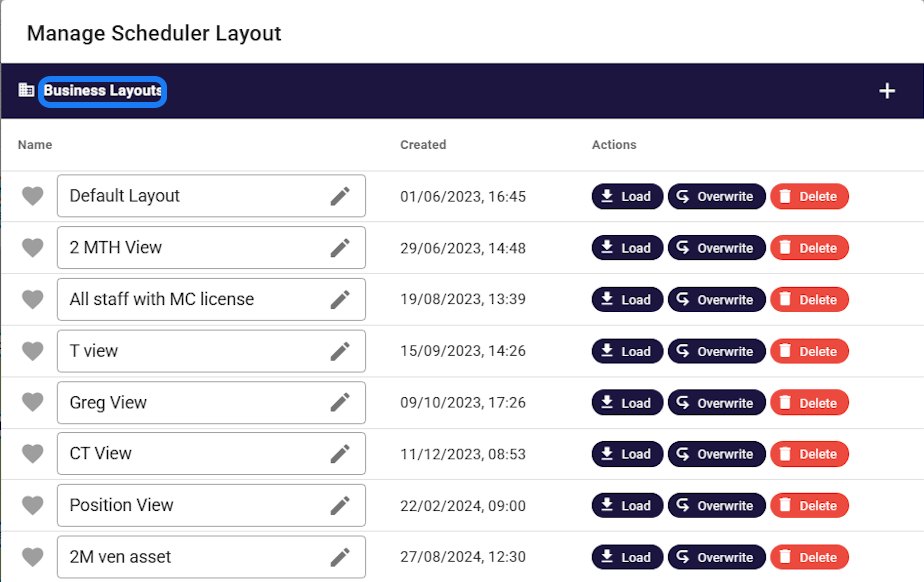
- Saved scheduler layouts do what your tabs used to. A “2-month view”, a “night crew” view, a per-client view, each one named, shared with the whole planning team, and always showing live data instead of last Tuesday’s copy
- Duplication with guardrails. Copy last swing forward and the system re-checks availability, qualifications and fatigue on the way through, then flags what broke
The chaos-to-control shift is visible in the numbers businesses track afterwards: fill rates, confirmations, planned-vs-worked hours. We showed what that reporting looks like in workforce rostering software for Australian teams, and the same live-view thinking is what kills no-shows in real-time rostering.
Frequently asked questions
Is the roster template free?
Yes. The Humanz roster template is a free Excel workbook with no sign-up, no email gate and no watermark, and you can copy, edit and share it inside your business as you like. It covers a fortnight across two week sheets, with a people and tickets register and a how-to sheet alongside.
Does the roster template work in Google Sheets?
Yes. Open Google Sheets, choose File then Import, upload the .xlsx file, and the formulas, drop-down lists and colour rules come across. If you would rather keep it as an Excel file, upload it to Google Drive and open it from there.
Does the template calculate overtime or pay?
No. It totals planned hours per person and for the week, flags rest gaps under 10 hours and colours tickets that are expiring or expired, and that is where it stops. Awards, penalty rates, allowances and pay are not in it; the planned-hours total is there so you can spot overtime before the week starts and apply your own award or agreement to it.
Is there a standard staff roster template for Australian businesses?
No single standard exists, because award requirements differ by industry. Any template you use should capture shift times, breaks, employment type, planned weekly hours and required qualifications. It’s also worth checking roster-change notice rules for your award with the Fair Work Ombudsman.
What’s the simplest roster template layout to start with?
People down the side, a start and a finish column for each day, one week per tab. Enter times rather than just writing Day, total the planned-hours column before publishing so overtime is a decision rather than a surprise, and put an expiry date next to any ticket due within 90 days. The free Humanz template is laid out that way with the three checks built in.
Are spreadsheet roster templates legal to use?
Perfectly. The law cares about the outcomes (hours, breaks, records, entitlements), not the tool. The practical risk is that a spreadsheet can’t warn you when a roster breaches rest rules or rosters an unqualified worker, so compliance depends entirely on the person driving.
When should a business move from templates to rostering software?
The honest markers are more than one site or client, weekly roster changes, casual or subcontract labour in the mix, or any compliance requirement you’re currently checking by eye. And casual-heavy is hardly rare. The Australian Bureau of Statistics counted 17% of employees, 2.1 million people, with no guaranteed minimum weekly hours in August 2025. If updating and re-sending the roster takes someone hours each week, the template has become a job.
How far ahead should a roster be published?
Many awards require rosters to be displayed or communicated in advance, and some set specific notice for changes. Beyond the legal floor, field businesses that publish one to two weeks ahead, with a way for workers to confirm, see materially fewer no-shows.
What shift pattern is best for 24/7 coverage?
There’s no universal best. 4 on / 4 off is simplest to staff, 2-2-3 trades some complexity for better weekends, and FIFO swings are their own discipline. The right answer balances coverage, fatigue accumulation and what your workforce will accept.
Can a spreadsheet template handle a FIFO swing roster?
It can draw one, and that’s about where it stops. A swing is logistics as much as a grid, with flights, camp rooms and changeovers all hanging off the pattern, and a spreadsheet can’t tell you who is qualified, rested and not already committed when Wednesday’s sick call comes in. Swings are usually where a template graduates into rostering software earliest.
Can I keep my roster structure if I move to software?
Yes. That’s the point of the transition. Your patterns become repeating shift templates and your favourite views become saved layouts, so planners keep the mental model they already have. What the software takes over is the maintenance, the distribution and the checking.
Related articles
Ready to see Humanz on your own roster?
Free 30-minute walkthrough, we'll use your real crews, sites and shift patterns.